Online ordering · 0% commission
Your own online ordering page, with no commission
Give your regulars one link for collection and delivery. You set the delivery area, fees and minimums. Orders come to your till to accept, and accepted orders go to the kitchen screen.
Paying for online orders: Customers pay at the counter or cash on delivery; online card payment isn't live yet.
£0 planUnlimited online orders · 1 location
£0 plan: 1 location · reports show the last 24 hours · other limits apply. See every limit
How it works
From switched on to your first order
- 01
Get your store ready
Add your contact number, address, map pin, opening hours, logo and time zone.
- 02
Set delivery zones and fees
Choose your delivery area by distance in miles. Give each ring a fee, a minimum order and a delivery time, then set your collection time.
Up to 1 mile · £3.00 · min £15Watch: delivery and collection · 3:03 - 03
Switch on and share your link
Switch on online ordering and set your pickup time. Check your menu is showing, then share your ordering link.
- 04
Accept at the till
Place a test order on your phone and accept it on the till. Accepted orders show at the till and on the kitchen screen.
How to go live with online ordering · 4:48
Watch it go live
Ready for orders in under five minutes of video
- 0:08Get your store ready
- 1:15Switch on online ordering
- 2:13Check your menu, share your link
- 2:54Place a test order
- 4:20Recap
Your page and the apps
They do different jobs. Keep both.
Delivery apps put you in front of new customers, and charge commission for it. Your own page is for the people who already know you. Put the link on your bags, menus, Google profile and Instagram, and those orders carry no commission.
Marketplace orders stay on the apps' own tablets. Walnut runs your counter, your phone orders and your own ordering page.
| Your own page | Delivery apps | |
|---|---|---|
| Commission on each order | 0% | Set by each app |
| Who finds the customer | You do, with your link | The app |
| Delivery area and fees | You set them, by the mile | Set in each app |
| Where orders arrive | Your till, then the kitchen screen | The app's own tablet |
| Online card payment | Not yet: at the counter or cash on delivery | Yes |
The customer's side
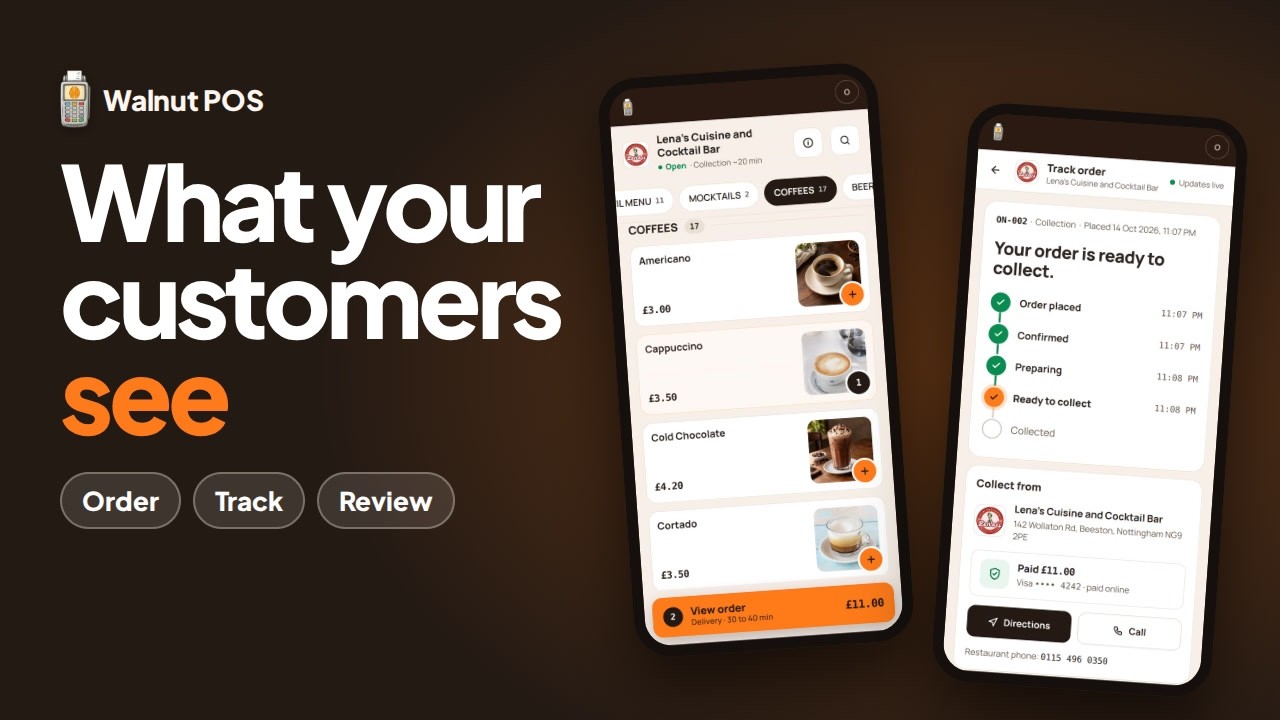
What your customers see on their phone
- Your ordering pageYour menu, under your restaurant's name.
- Collection or delivery at checkoutDelivery follows the zones, fees and minimums you set.
- Live order trackingThey can follow their order after they place it.
Customers pay at the counter or cash on delivery; online card payment isn't live yet.
What the £0 plan includes
Unlimited online orders and menu items, with 0% commission on every one. Other £0-plan limits: 1 location, 50 customers, reports show the last 24 hours.
Questions
Online ordering questions
Can customers pay by card online?
Not yet. Customers pay at the counter or cash on delivery; online card payment isn't live yet.
Is there a commission on online orders?
No. There's 0% commission on your own online orders, and online orders are unlimited on both plans, the £0 plan included.
How do delivery zones work?
You set your delivery area by distance in miles. Each ring has its own fee, minimum order and delivery time, for example up to 1 mile, £3.00, minimum £15. You also set a collection time.
Where do the orders show up?
At your till, where you accept them. Accepted orders show at the till and on the kitchen screen, alongside your other tickets.
Does it replace my Just Eat, Deliveroo or Uber Eats tablet?
No. Marketplace orders stay on their own tablets. Walnut runs your counter, your phone orders and your own ordering page.
Customers pay at the counter or cash on delivery; online card payment isn't live yet.
Related guides
 How to go live with online ordering4:48 · video and written steps
 How to set delivery and collection3:03 · video and written steps
 What your customers see when they order online4:47 · video and written steps
 How to get your store online2:46 · video and written steps
 How to set up a kitchen display and route orders3:07 · video and written steps
Send your regulars your own link
Unlimited online orders on the £0 plan, with 0% commission on every one. No card, no contract.
£0 plan: 1 location · reports show the last 24 hours · other limits apply. See every limit